Personal home page

We’re currently integrating our cloud solutions into bechtle.com. Some features described in this article may not be available yet while the migration is in progress.

When you log in, you’ll first land on your personal home page, where you can see an overview of information, content and to-dos relevant to you.

OVERVIEW AND PURPOSE

Your personal home page gives you quick access to your personal contacts, to-dos, shared content, shopping lists and other information. The page may also display personalised recommendations, quotes and current updates. So erhalten Sie schnellen Zugriff auf relevante Funktionen, offene Aufgaben sowie für Sie interessante Themen und Produkte.

A closer look

For a quick overview of the most important features, take a guided tour of your personal home page.

Welcome message and company logo

The home page displays your profile picture, a welcome message and your company logo. The logo can be used to add your organisation’s branding to your account.

Select the logo or placeholder image to open Account information, where you can upload and manage a company logo.

Welcome message and company logo

Widget bar

The widget bar provides quick access to selected information and actions, including contacts, to-dos, dashboard information and shared content. Dadurch erhalten Sie direkten Zugriff auf die für Sie relevanten Funktionen und Inhalte.

Widget bar with contact, dashboard, to-dos and shared content

My Bechtle contact

The My Bechtle contact widget displays the name, phone number and e-mail address of your assigned contact person.

Some users may have multiple contacts, for example a dedicated contact for cloud services. In this case, the widget allows you to switch between available contacts.

Dashboard

The Dashboard widget displays selected information from your dashboard, including orders pending approval, available quotes, open returns, cloud services and other dashboard widgets.

Use the navigation control to switch between available dashboard items. Selecting an item opens the corresponding page. Use the link in the widget header to open the full dashboard.

To-dos

The To-dos widget displays tasks and notifications that require your attention, such as orders awaiting approval, available quotes, unassigned licences and expiring cloud subscriptions.

Select an item to open the corresponding page.

Shared content

The Shared content widget displays information, links and files. Content can be provided by Bechtle or by administrators of your organisation. Administrators can manage content through the Shared content page, which can be accessed from the widget.

If no content is available, personalised recommendations may be displayed instead.

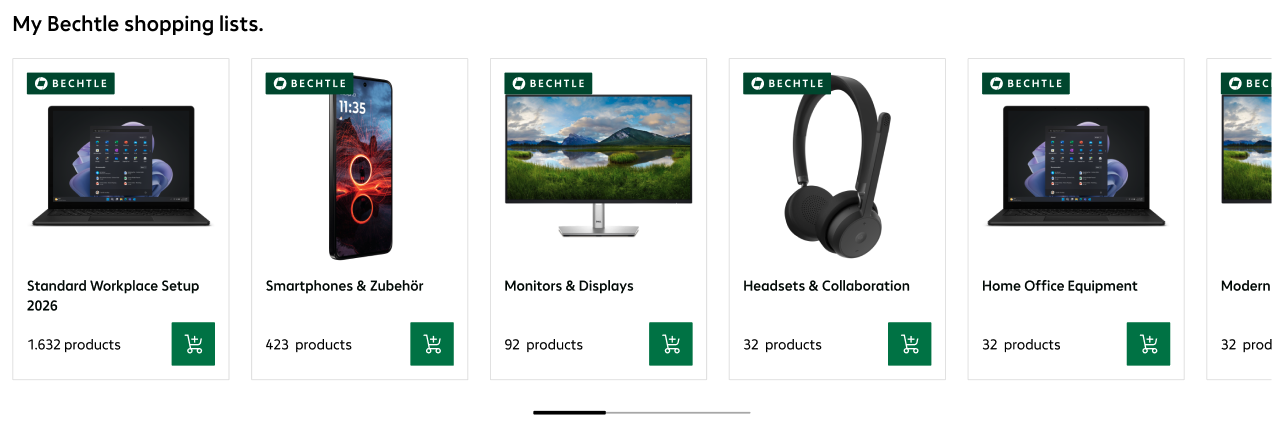
Shopping lists

Shopping list carousel

Your shopping lists are displayed in a carousel below the widget bar, with a cover image, list name and number of products. They may include your own shopping lists, as well as shopping lists shared with you by other users of your organisation or Bechtle.

Select a shopping list to open it, or use the basket icon to add all products from the list directly to your basket.


Shopping lists

Personalised content and recommendations

Additional content

The home page may display additional content, such as personalised offers, product recommendations, service information and other account-specific content.


You might also be interested in...

Need help with something else?

Get help from our virtual assistant or get in touch with your account manager.