iPad refresh for schools
– Because modern education needs modern technology.
Why an iPad refresh matters now.
Your school shapes the future of its students—outdated technology shouldn’t stand in the way. Older iPad devices can limit performance, security and the learning experience. A planned refresh not only brings the latest technology into your classrooms, but also opens up entirely new ways to teach and learn.
Benefits at a glance:

More power for better lessons:

Ready for today’s learning apps:

Innovative teaching methods:

Cost efficiency and transparency:
Our solutions for your iPad refresh.
1. Parental financing
– an iPad for every child.
With our flexible parental financing model, every child receives a powerful iPad—without impacting the school’s budget. Bechtle manages the entire process, while parents can pay for devices conveniently in flexible monthly instalments.
Your benefits:
- Flexibility – Choose from a range of payment plans, terms and optional payment breaks.
- Ready to use – Every device arrives fully pre-configured, including MDM, and comes with the right accessories.
- Comprehensive protection – Full cover for accidental damage, including drops and damage during transport, for up to three years.
We handle everything—from a dedicated web shop for parents to delivery and technical support.
2. Leasing for schools
– The central solution for educational institutions.
Our leasing model is the ideal solution for centrally managed device pools. Schools receive the latest iPad devices at predictable monthly rates—without large upfront investments.
Why leasing makes sense:
- Cost transparency – Predictable payments instead of high initial costs.
- Regular upgrades – At the end of your lease, seamlessly upgrade to the latest generation of devices.
- Seamless integration – Compatible with Apple School Manager and MDM.
- Worry-free returns – Simple returns or seamless upgrades at the end of your contract.
Why choose Bechtle? Your partner for a seamless rollout.
At Bechtle, we go beyond simply supplying hardware. We support you throughout the entire process—from planning to successful integration.
Our all-round service for your iPad refresh:
- Personal consultation – We help you find the financing models that fit your needs.
- Rollout and configuration – Our certified technicians ensure fast, secure and straightforward setup.
- Guaranteed support – Our technical support team is always on hand to help.
- Sustainable solutions – Device take-back and secure disposal of old equipment are an integral part of our service.
Which iPad is right for your school?

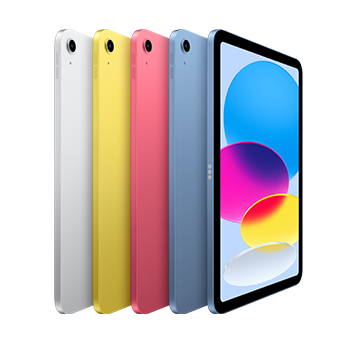
All-rounder. Creative tool. Classroom favourite.
11" Liquid-Retina-Display – The stunning Liquid Retina display is perfect for watching films or sketching out your next masterpiece. True Tone technology adapts to the light in the room for a more natural viewing experience in any environment.
iPad OS + Apps – iPadOS – iPadOS makes iPad more productive, intuitive, and versatile. With iPadOS, run multiple apps at once, use Apple Pencil to write in any text field with Scribble, and edit and share photos. iPad comes with essential apps like Safari, Messages, and Keynote, with over a million more apps specially developed for iPad available on the App Store.
Apple Pencil und Magic Keyboard Folio – The Apple Pencil (USB-C) transforms your iPad into an impressive canvas and the world’s best note‑taking device. The Magic Keyboard Folio has a versatile two-piece design including a detachable keyboard and a protective back panel that both attach magnetically to your iPad. Apple Pencil (1st generation) is also compatible with iPad.


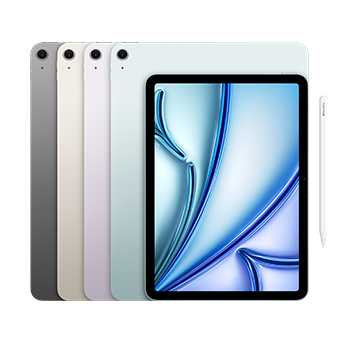
iPad Air. Built for Apple Intelligence.
11" Liquid-Retina-Display – The gorgeous Liquid Retina display features advanced technologies like P3 wide colour, True Tone, and ultralow reflectivity, which make everything look stunning.
Built for Apple Intelligence – Apple Intelligence is the personal intelligence system that helps you write, express yourself and get things done effortlessly. With groundbreaking privacy protections integrated into the core of iPad, it gives you peace of mind that no one else can access your data—not even Apple.
iPad OS + Apps – iPadOS makes iPad more productive, intuitive, and versatile. With iPadOS, run multiple apps at once, use Apple Pencil to write in any text field with Scribble, and edit and share photos. iPad comes with essential apps like Safari, Messages, and Keynote, with over a million more apps specially developed for iPad available on the App Store.
Apple Pencil and Magic Keyboard Folio – The Apple Pencil (USB-C) transforms your iPad into an impressive canvas and the world’s best note‑taking device. The Magic Keyboard Folio has a versatile two-piece design including a detachable keyboard and a protective back panel that both attach magnetically to your iPad. Apple Pencil (1st generation) is also compatible with iPad.